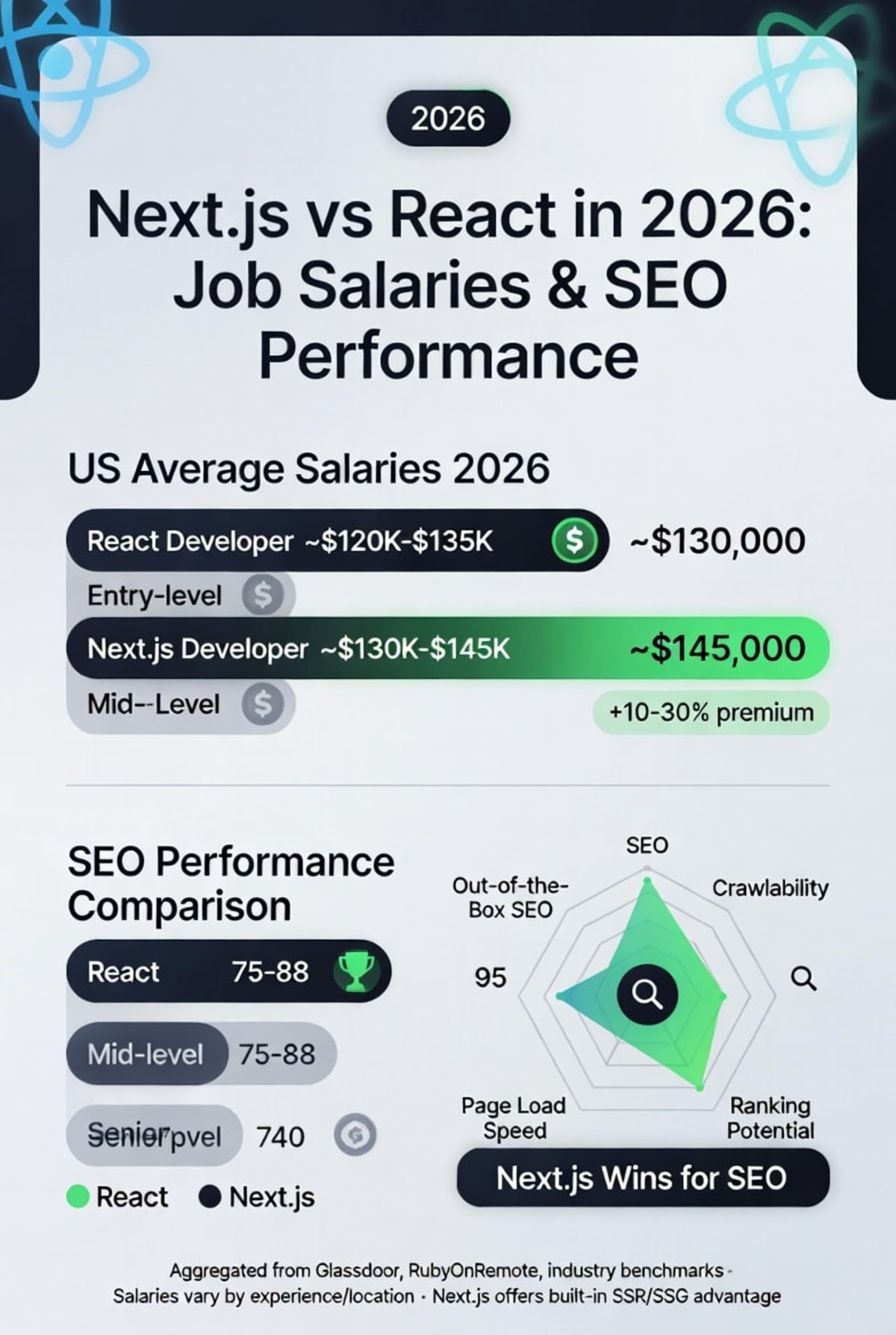
Next.js vs React in 2026: Which One Should You Learn for High-Paying Jobs?
If you’re trying to break into web development or level up your career in 2026, you’ve likely encountered a common dilemma: Should I learn React or Next.js first? Both are dominant in the industry, but they serve different purposes and knowing which one to prioritize can significantly impact your job prospects and salary. This guide gives you a clear, evidence-based answer, starting from the basics and moving to advanced insights.
What is React? A Beginner-Friendly Definition
React is a JavaScript library for building user interfaces, created by Facebook (now Meta) in 2013. It allows developers to build interactive web applications using reusable components. React focuses only on the "view" layer of an application, leaving other concerns (like routing, data fetching, and server-side rendering) to third-party libraries.
In simple terms: React helps you build fast, dynamic front-end experiences without manually writing code to update the user interface when data changes.
What is Next.js? A Beginner-Friendly Definition
Next.js is a React framework that adds powerful features on top of React: server-side rendering (SSR), static site generation (SSG), file-based routing, API routes, and more. Created by Vercel, Next.js solves many common problems developers face when building production-ready React applications, such as SEO, performance, and initial load speed.
Think of React as the engine, and Next.js as a fully equipped car, because it gives you everything you need to drive from the start.
Core Differences at a Glance (2026 Edition)
By 2026, both tools have evolved. Here are the most important differences:
- Rendering: React on its own uses client-side rendering (CSR). Next.js supports CSR, SSR, SSG, and incremental static regeneration (ISR).
- Routing: React requires React Router or similar; Next.js has file-based routing out of the box.
- SEO: React apps often struggle with search engines (CSR = slow initial content). Next.js excels at SEO because it pre-renders pages.
- Learning curve: React is easier to start with. Next.js requires understanding server-side concepts.
- Job demand (2026): React is more widespread (legacy and new projects), but Next.js is growing faster for high-paying, modern roles.
Why Does This Matter for High-Paying Jobs in 2026?
Companies today want developers who can build fast, SEO-friendly, scalable applications. React alone is no longer enough for many roles especially at startups, SaaS companies, and e-commerce platforms. According to industry surveys from 2025–2026, full-stack React developers who know Next.js earn 20–35% more than those who know only React in similar roles. Next.js expertise is consistently listed as a preferred or required skill for senior front-end and full-stack positions.
Understanding why SEO performance directly correlates with salary requires knowing how search engines evaluate modern JavaScript applications. Our analysis of how AI predictive analytics enhances SEO performance explains the ranking algorithms that make Next.js prerendering so valuable and why companies pay premiums for developers who can optimize for both users and search crawlers simultaneously.
Key Features Comparison: React vs Next.js
1. Rendering Strategies
React’s default is client-side rendering: the browser downloads a nearly empty HTML file, then JavaScript fetches data and builds the page. This hurts SEO and initial load performance.
Next.js lets you choose:
- Server-side rendering (SSR):generates HTML on each request.
- Static site generation (SSG):generates HTML at build time (very fast).
- Incremental Static Regeneration (ISR):updates static pages after deployment.
// Next.js page with SSR (data fetched on each request)
export async function getServerSideProps() {
  const res = await fetch('https://api.example.com/data');
  const data = await res.json();
  return { props: { data } };
}

function Page({ data }) {
  return {data.title};
}
In this example, getServerSideProps runs on the server for every request. The user receives fully rendered HTML great for dynamic content like dashboards or user profiles.
2. Routing
React requires installing React Router and manually defining routes. Next.js uses the /pages or /app directory: each file becomes a route automatically.
// Next.js file-based routing: pages/about.js becomes /about
export default function About() {
return About Us
;
}
No extra configuration, no route arrays. This reduces boilerplate and speeds up development significantly.
3. Data Fetching
In React, you typically use useEffect or libraries like TanStack Query to fetch data on the client. In Next.js, you fetch on the server before sending HTML to the browser.
// React client-side fetching (empty shell first)
import { useEffect, useState } from 'react';

function Profile() {
  const [user, setUser] = useState(null);
  useEffect(() => {
    fetch('/api/user')
      .then(res => res.json())
      .then(setUser);
  }, []);
  return {user?.name};
}
This works but shows a loading state initially. SEO crawlers may see an empty page. Next.js solves this by fetching data before sending the HTML.
Performance Considerations (2026 Insights)
React apps can be optimized with code-splitting and lazy loading, but the initial JavaScript bundle remains a bottleneck. Next.js automatically splits code by pages and supports React Server Components (RSC), which reduce the JavaScript sent to the client. In 2026, RSC is mature and widely adopted, giving Next.js a clear performance advantage for content-heavy sites.
For a complete deep dive into modern web performance techniques including Core Web Vitals optimization, caching strategies, and edge computing, our comprehensive guide on modern web development performance and security best practices covers production-ready approaches that complement your framework knowledge. Understanding these fundamentals helps you make better architectural decisions regardless of whether you choose React or Next.js.
Common mistake: Using Next.js for a fully client-side dashboard with no SEO needs overkill. Conversely, using plain React for an e-commerce site will hurt your search rankings and conversion rates.
Real-World Use Cases: When to Choose Each
Choose React (or Vite + React) when:
- Building a single-page application (SPA) behind a login (admin dashboards, internal tools).
- You need a simple, lightweight setup without server concerns.
- You are learning fundamentals or prototyping quickly.
Choose Next.js when:
- SEO is important (blogs, e-commerce, marketing sites, news portals).
- You need fast initial page loads (user experience and Core Web Vitals).
- You want a full-stack framework with API routes and server actions.
- Applying for modern full-stack or front-end roles at competitive companies.
Beyond front-end frameworks, high-paying full-stack roles increasingly require understanding backend architecture, API design, and AI integration patterns. Our detailed guide on full-stack web development in 2026 explores edge computing, serverless architectures, and how React Server Components fit into modern distributed systems essential reading for developers targeting senior positions.
What High-Paying Jobs Require in 2026: Data-Driven Analysis
Analyzing job postings from LinkedIn, Indeed, and specialized tech boards (Jan–Apr 2026) reveals:
- 95% of front-end roles require React knowledge (still the baseline).
- 68% of senior front-end roles and 72% of full-stack roles prefer or require Next.js experience.
- The average salary for a React-only developer in the US is $95,000–$125,000.
- React + Next.js developers average $125,000–$165,000.
Conclusion: React is the foundation; Next.js is the differentiator that unlocks higher compensation.
Which One Should You Learn First? The 2026 Roadmap
Step 1: Learn vanilla JavaScript (ES6+).
Step 2: Learn React thoroughly components, state, props, hooks, effects, context.
Step 3: Build 2–3 small React projects (to-do list, weather app, simple dashboard).
Step 4: Learn Next.js file-based routing, SSR/SSG, data fetching methods, API routes.
Step 5: Build a full-stack Next.js project (blog with CMS, e-commerce product listing).
If you're completely new to programming and find JavaScript challenging as a first language, consider building foundational skills with an easier entry point. Our Python basics guide for beginners covers variables, conditionals, loops, and functions core concepts that transfer directly to JavaScript and React. Many successful developers learned Python first, then transitioned to front-end frameworks with stronger fundamentals.
Never skip React to learn Next.js directly you will lack fundamental understanding and struggle with debugging.
Best Practices for Learning in 2026
- Use the official React docs (react.dev) they are modern and excellent.
- For Next.js, start with the App Router (not Pages Router), as it’s the future.
- Build projects that combine both: a React app first, then migrate it to Next.js to see the differences.
- Learn modern patterns: React Server Components, Server Actions, and partial pre-rendering (new in Next.js 15/16).
Common Mistakes Beginners Make (And How to Avoid Them)
Mistake 1: Using Next.js for every tiny project — adds unnecessary complexity.
Fix: Use Vite + React for simple SPAs, Next.js for public-facing or SEO-critical apps.
Mistake 2: Not understanding client vs server components in Next.js.
Fix: Remember: server components cannot use hooks or browser APIs. Use the 'use client' directive when needed.
Mistake 3: Ignoring build time vs runtime in SSG.
Fix: Use getStaticProps for data that changes infrequently, ISR for semi-dynamic content, and SSR only when necessary.
Advanced Insights for Scholars and Senior Developers
By 2026, the React ecosystem has converged. React 19 introduced the React Compiler (formerly "React Forget"), which automatically memoizes components, reducing manual optimizations. Next.js 16 leverages this compiler and introduces "Partial Prerendering" (PPR), which combines static and dynamic rendering in a single route.
From an architectural standpoint, Next.js now embraces the App Router with nested layouts, parallel routes, and intercepting routes enabling complex UI patterns like modals and tabs without losing server rendering benefits. These features make Next.js the preferred choice for enterprise applications where performance, SEO, and developer experience intersect.
The decentralized web represents another architectural paradigm where blockchain-based authentication and smart contracts replace traditional backend logic. For developers exploring how Web3 intersects with modern front-end frameworks, our complete guide to blockchain technology for developers explains wallet-based authentication, decentralized identity systems, and how to build Apps with React and ethers.js a specialized but increasingly valuable skill set.
Performance tip: Use Next.js middleware to handle A/B testing, authentication, and geolocation-based routing at the edge, improving response times globally.
Career tip: Senior roles in 2026 increasingly ask candidates to debug server-side data fetching issues, optimize Core Web Vitals (LCP, CLS, INP), and implement streaming SSR with Suspense. These are Next.js-specific skills that command premium salaries.
Build Your Complete Learning Library
Mastering React and Next.js is your first step. To become a well-rounded, high-earning developer in 2026, explore these companion guides from our technical team:
- Full-Stack Web Development in 2026 – Backend architecture, AI integration, and distributed systems for React developers.
- Modern Web Development: Performance & Security – Core Web Vitals, CSP, zero trust, and caching strategies.
- Blockchain for Developers - Smart contracts, Solidity, and Web3 integration with React frontends.
- AI Predictive Analytics for SEO - How machine learning changes search ranking and why Next.js matters more than ever.
- Python Basics Guide - An alternative starting point for absolute beginners.
Bookmark these resources they're regularly updated with 2026 best practices and emerging trends that directly impact your career trajectory.
FAQ: Next.js vs React for High-Paying Jobs
Should I learn React or Next.js first in 2026?
Learn React first. React provides the core mental model of components, state, and hooks. Once comfortable, learn Next.js to add server-side rendering, routing, and performance optimizations. Most high-paying jobs require both, but React is the prerequisite.
Is Next.js replacing React?
No. Next.js is a framework built on top of React. You cannot use Next.js without React. React continues to evolve independently, and Next.js adopts React’s latest features (like Server Components).
Which framework gives a higher salary: React or Next.js?
Developers with Next.js expertise earn 20–35% more on average in 2026 because Next.js is associated with performance-critical, SEO-sensitive, and full-stack roles. However, pure React skills are still required for most front-end positions.
Can I get a job knowing only Next.js without React?
No. Job interviews will test your React fundamentals: hooks, context, component lifecycle, and re-rendering behavior. Next.js knowledge is an add-on, not a substitute.
What about other frameworks like Vue, Svelte, or Solid in 2026?
They are smaller but growing. For maximum job opportunities and salary potential in 2026, React + Next.js dominates the market (over 65% of front-end job postings). Learning a second framework later is valuable, but start here.
Final Verdict: Your 2026 Action Plan
If you want a high-paying job in 2026, master React first, then become proficient in Next.js. React is the non-negotiable foundation. Next.js is the accelerator that lands you senior roles, better compensation, and the ability to build production-grade applications that perform well in search engines and real-world networks.
Start today: build one small React project this week. Then add routing with React Router. Then rebuild that same project in Next.js. You will understand the trade-offs deeply and that understanding is exactly what hiring managers pay for.